

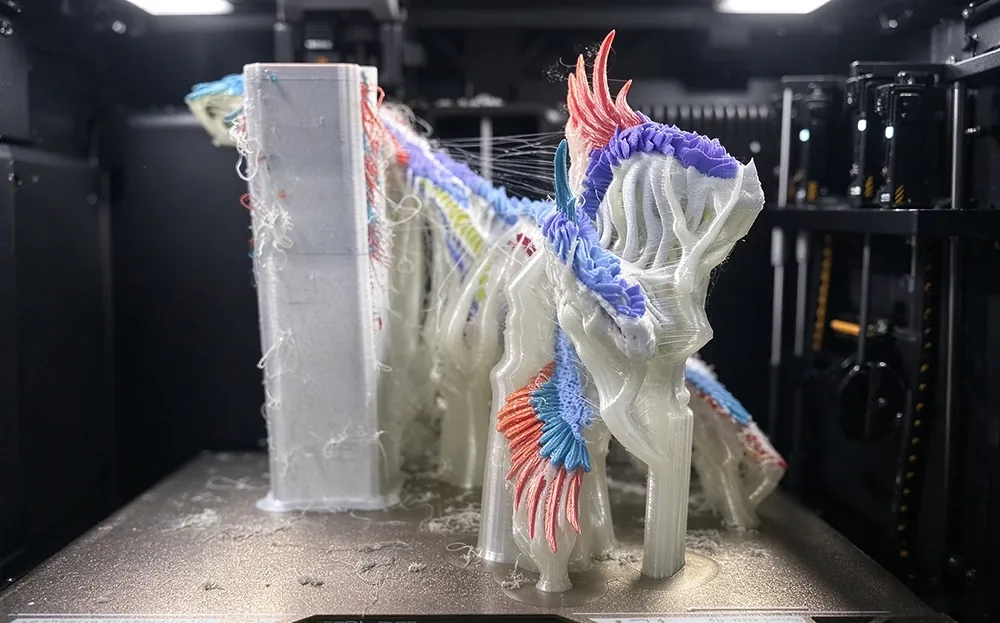
Stringing usually comes from melted plastic leaking during travel. Dry the filament, lower nozzle temperature, increase travel speed and tune retraction one step at a time. PETG is especially prone to it.
Material comparison data
| Material | Diameter | Density | Nozzle | Bed | Print speed | Key mechanical data |
|---|---|---|---|---|---|---|
| PETG | 1.75 ±0.02 mm | 1.27 g/cm³ | 220–250°C normal; 240–250°C high-speed | 60–80°C | 40–60 mm/s normal; 150–200 mm/s high-speed | Elongation 10%; Flexural 2,060–2,160 MPa |
| TPU | 1.75 ±0.02 mm | Not supplied | 215–235°C | 0°C or 60–80°C | 20–40 mm/s | Not supplied |
Source: PIBUNO project material workbook and existing product templates. “Not supplied” means the project did not include a verified value; it is not an industry default.
Check moisture first
Water vapor can foam at the nozzle and leave rough webs. Dry the spool and test again.
The filament drying guide and storage guide prevent repeat problems.
Lower temperature carefully
Print a temperature tower with small separated posts. Find the lowest temperature that still has good layer bonding.
Do not reduce temperature until the material under-extrudes.
Tune travel and retraction
Test:
- Travel speed
- Retraction distance
- Retraction speed
- Wipe behavior
- Z-hop
Make one change at a time and label the sample.
Check nozzle condition
A worn or partially blocked nozzle can produce unstable flow and blobs. Clean or replace it when the pattern changes after a long run.
Material differences
PETG often strings more than PLA. TPU may need little or no retraction. The PETG temperature guide explains the specific setup.
The Pibuno PETG category and product catalog help compare the exact material.
Separate stringing from blobs
Thin webs between separate towers are stringing. A lump on the side of a part, a rough zipper seam or a sudden missing section may be a different problem.
Inspect the nozzle and extrusion path when the defect includes popping, irregular width or a burned spot. A mechanical issue will not disappear with a lower temperature.
Use a fixed test part
Keep one small test model with four separate posts, a short bridge and a two-centimeter tower. Print it at the same speed and layer height each time.
Photograph the test under the same light and name the file with the temperature, retraction and material. A written sample history is more useful than remembering which print worked.
Decide when the result is good enough
Fine hair-like strings can be removed with a heat gun or trim tool when they do not affect the product. Aggressive settings that remove every string but create weak layers are not a better production result.
Approve the surface after the actual post-processing step. A test tower is only a screening tool.
Check the initial settings
Record the nozzle diameter, layer height, temperature, retraction and travel speed before changing anything. Without a baseline, it is hard to know which change helped.
Dry the spool and verify the nozzle. A partially blocked nozzle can create strings and blobs that look like a tuning issue.
Change one factor
Start with moisture and temperature. Then test travel speed, retraction distance and wipe behavior.
Increase retraction in small steps. Excessive retraction can create gaps, grinding and a heat-creep problem.
PETG-specific pattern
PETG can remain sticky at the nozzle and form long strings. A moderate temperature, dry material and fast travel often matter more than a very large retraction command.
The PETG temperature guide explains the starting profile.
When the defect is mechanical
If strings include black specks, irregular blobs or a changed extrusion rate, inspect the hot end and feeder. Cleaning the material path may fix a problem that tuning cannot.
Approve the actual surface
Print the production geometry after the test tower. Check the part after the planned post-processing and under the final light.
Keep the profile
Keep the test model, changes and result with the slicer project. A future operator should not have to recreate the test sequence.
Start with the easiest checks
Clean the nozzle, inspect the filament diameter and dry the spool. A contamination or moisture problem can defeat repeated profile changes.
Check the first layer separately from travel behavior. A nozzle that drags can collect residue and release it later as a blob.
Build a comparison set
Print the same test at two temperatures and two travel speeds. Keep the other values fixed.
Label each sample and record the result. The best profile should be selected from repeatable evidence, not memory.
When the material is not the cause
A worn PTFE tube, loose extruder gear or unstable heater can produce irregular flow. Inspect the machine if the problem changes between prints without a slicer change.
Finish the part
Use the approved post-processing method before judging the surface. A hair-like string that is easily removed may not require a more aggressive print profile.
Fix one layer at a time
First layer strings can come from nozzle height or a dirty bed. Upper-layer strings usually point to travel and temperature.
Inspect the full part rather than only a small tower.
Keep the environment stable
A draft can affect cooling and string formation. Record whether the printer is enclosed or near moving air.
Recheck after changing spools
A new spool can change the result even when the material family is the same. Dry it and print the approved test before updating the profile.
Separate the test goals
Use one print to find the temperature and another to tune retraction. Changing both together makes the result ambiguous.
Label the samples and keep the best profile with the spool and printer.
Check the model
Travel across open space creates more opportunity for strings. If the production geometry is dense, the test tower may exaggerate the issue.
Approve the real geometry after the profile passes the basic test.
Record the nozzle condition
A worn or dirty nozzle changes the flow. Clean or replace it before assigning the defect to material settings.
Keep the old nozzle condition in the maintenance record.
Evaluate the finish
Check whether the strings can be removed without damaging the product.
Approve the method after actual post-processing, not only on the test tower.
Finish the comparison
Print the best candidate on the actual product and inspect it after the planned cleanup. Keep a tagged sample with the spool and profile.
If a new batch strings, repeat the reference test before changing the original profile.
Inspect the nozzle
Clean the outside and check for wear or partial blockage. A dirty nozzle can drag material and create blobs when travel begins.
Change the nozzle if the flow pattern stays inconsistent after cleaning. Record the change before continuing the profile test.
Keep the surface expectation realistic
A production part with a dense shape may show fewer strings than an open test tower.
Approve the part after the actual cleanup and final inspection. Keep the test sample with the approved settings.
Confirm the approved result
Print the production part after the test tower and inspect it after cleanup. Keep the profile with the material lot.
If a new spool strings, compare it with the approved sample before changing the printer.
Check the nozzle and path
Inspect the nozzle for wear and clean the filament path. Contamination can create blobs even when the profile was previously stable.
Keep the approved profile
Store the test model, material lot and final settings together. A new spool should repeat the same test before replacing the profile.
Inspect the completed part after trimming or heat treatment. Fine strings may disappear, while a real under-extrusion problem will remain.
Check storage
If stringing returns after a period of good printing, check moisture and the storage container before changing the profile.
Keep the dried reference spool as a control.
Finish the comparison
Print the production geometry after the best profile is found. Check the surface after actual cleanup and keep the sample with the material label.
If a later spool behaves differently, repeat the reference test before changing the profile.
Verify the production part
Use the test tower to narrow the settings, then print the product geometry. Check the surface after the actual cleanup.
Dry the material and inspect the nozzle if a previously approved profile starts stringing again.
Keep the best sample and its settings with the production file.
Confirm the production surface
Print the product geometry after the test. Compare it with the approved sample after the actual cleanup.
If a new spool changes the result, dry it and repeat the reference test before changing the profile.
Keep the evidence
Store the final test part, material lot and settings. A later operator can then reproduce the result without reopening every variable.
If a new batch shows the same defect, compare the material label and storage condition before assuming the profile has changed.
Compare the final product
After the test tower, print the production part and inspect the area the customer will see. Keep the final profile with the material label.
Check the approved part again after storage, drying or a material change.
Keep the material lot and print profile with the sample.
Repeat the test after the production run is complete.
Retain the approved profile and sample together.
FAQ
Why does PETG string?
Moisture, high temperature, slow travel and retraction settings are common causes.
Does more retraction always help?
No. Excessive retraction can cause clogs, gaps and grinding.
Can bad filament cause stringing?
Moisture or a contaminated spool can. Test a dry reference before replacing the material.
Is stringing only cosmetic?
It can affect surface quality, remove easily during post-processing or indicate an extrusion problem that also weakens layers.