

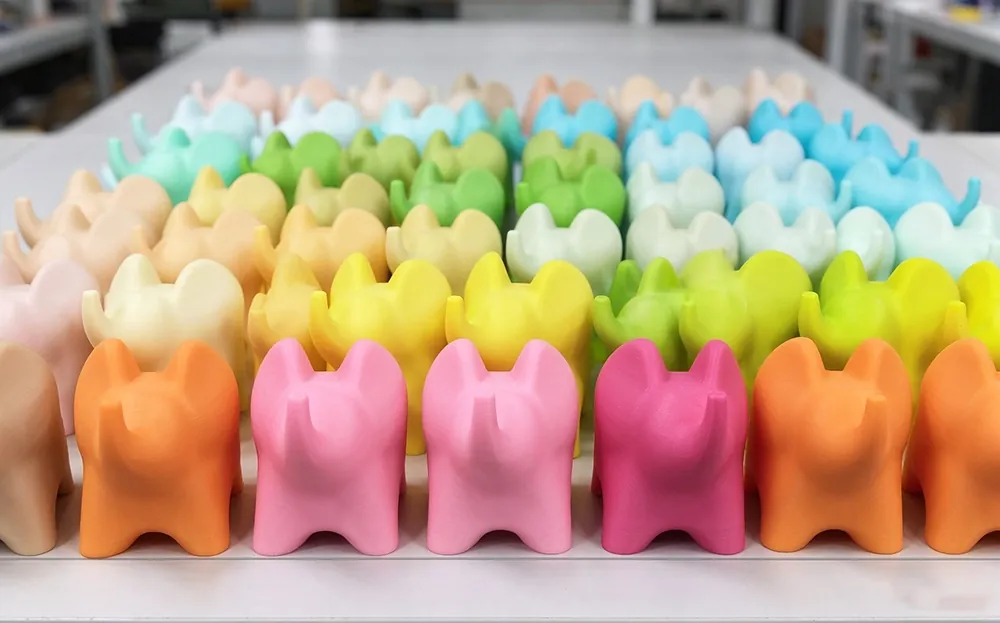
Custom color filament begins with a physical target, not a color name. The buyer should define the material, finish, lighting condition, acceptable color tolerance and order quantity before asking for a production sample.
Material comparison data
| Material | Density | Nozzle | Bed | Print speed | Key mechanical data | Data status |
|---|---|---|---|---|---|---|
| PLA | 1.25 ±0.05 g/cm³ | 195–230°C | 0–60°C | 40–60 mm/s | Tensile 60 MPa; Elongation 3.0%; Flexural 1,900 MPa | Complete |
| PETG | 1.27 g/cm³ | 220–250°C normal; 240–250°C high-speed | 60–80°C | 40–60 mm/s normal; 150–200 mm/s high-speed | Elongation 10%; Flexural 2,060–2,160 MPa | Partial |
Source: PIBUNO project material workbook and existing product templates. “Not supplied” means the project did not include a verified value; it is not an industry default.
Start with the application
The same color can look different on silk, matte, transparent and standard PLA. Decide the material and surface before matching color.
Also define:
- Base material
- Gloss or matte finish
- Opacity
- Diameter
- Net weight
- Spool format
- Label and packaging
The Pibuno PLA category provides a reference for standard and effect product families.
Send a physical reference
A Pantone code, RGB value or phone photo is not a complete color specification. A physical chip, printed part or approved sample is more reliable.
Review the sample under daylight, retail lighting and the light used by the final customer. Keep the approved reference in a controlled location.
Ask about the colorant
The supplier should explain whether the color comes from a masterbatch, compound or surface effect. The colorant must suit the base polymer and processing temperature.
For a brand program, ask whether the approved color can be repeated in future batches.
Approve a filament sample
Check:
- Color against the reference
- Gloss and texture
- Diameter
- Print surface
- Layer bonding
- Packaging and label
Print a small finished part. A color chip can match while the printed surface looks different.
See Pibuno's product catalog and OEM page for related customization topics.
Plan production tolerance
No manufacturing process matches a color perfectly forever. Define how much variation is acceptable and how the supplier will inspect it.
Use a signed sample, approved lighting and a batch record. Add a process for notifying the buyer if the formulation changes.
Packaging and samples
Custom color projects often need:
- Individual labels
- Retail boxes
- Outer cartons
- Barcodes
- Sample quantities
- Wholesale quantities
Review the samples page and wholesale page before confirming a first order.
Define the project inputs
Write down the base polymer, finish, opacity, diameter, net weight, spool, packaging and expected order quantity. A color target without these inputs can lead to a sample that cannot be produced at the required price or volume.
Use a controlled color reference
Measure the reference under defined lighting and keep the physical sample protected. A digital code can help communication, but the final approval needs a physical comparison.
Inspect the printed sample
Compare color, gloss, surface and layer appearance with the reference. Check that the label and packaging present the approved information.
Plan the transition to production
Agree on the sample quantity, approval sign-off, production tolerance and batch record. Define who is responsible for each approval.
Repeat orders
Keep the approved sample, formulation reference and packaging proof. If the supplier changes raw material or colorant, review the result before shipping the next batch.
The OEM page and product catalog provide the next commercial context.
Approve color under defined light
Use daylight and the final retail light. A color that matches under one source may look different under another.
Keep the approved chip and printed sample in a protective folder. Record the material, finish and reference date.
Plan a pilot batch
The pilot should use production equipment, not only a small lab sample. Check color through the spool, diameter and printing behavior.
Inspect a printed product and packaging label. A filament match that looks right on the reel can change after printing.
Agree on acceptance criteria
Define acceptable color variation, diameter tolerance, net weight and packaging content.
State who approves a deviation and what evidence is required. This avoids relying on opinion after delivery.
Protect the brand
Keep label text, barcode and product name consistent with the approved design. A packaging proof should be signed before mass production.
Plan the approval schedule
Reserve time for reference selection, sample production, print testing and packaging proof. A color project can fail late if the printed appearance was never reviewed.
List the approval owner for each step. The buyer, supplier and production team should use the same reference.
Define what changes trigger a resample
A new base polymer, finish, colorant or production source should trigger a review. The old approval does not automatically cover a materially different product.
Keep the change record with the approved sample.
Compare cost at the approved quality
A cheaper custom color may not be worthwhile if it requires more rejects or does not match the package. Compare the total delivered project, including samples and packaging.
Build a project file
Include the color target, material, finish, diameter, spool, label, packaging, sample image and approval date.
Keep the signed physical reference with the project record.
Check the first production run
Inspect multiple positions on the spool and several printed parts. A sample from one section may not represent the batch.
Compare the packing against the approved proof.
Plan repeat orders
Define how long the color approval remains valid and what changes trigger a new sample.
This prevents future orders from drifting while still allowing controlled production.
Keep packaging aligned with the filament
The color, material and spool size on the label should match the approved product.
Check the outer carton and barcode before shipping. A correct filament with the wrong packaging still creates a customer issue.
Close the project
Store the final reference, technical record and packaging proof in one project file. Use that file for the next reorder.
Manage color from sample to shipment
Keep the reference, print sample and package proof together. Check a new production run against all three.
A color that matches the chip can still look wrong beside the retail package.
Make change control explicit
Record who approved the sample and which material, finish and lighting were used. A later change should trigger a new review.
Define measurable approval criteria
Use a physical color reference, a defined lighting condition and a printed sample. Record the material, finish and print profile.
If color variation is allowed, state the limit and how it will be checked. The same rule should apply to future batches.
Protect the production reference
Keep the approved chip and print away from sunlight and contamination. A faded reference cannot support a later color decision.
Use a change record when the material or colorant changes. A new supplier is a new approval, even if the code name stays the same.
Keep the custom project controlled
Use one project record for the color target, material, finish, packaging and approval. A new base material or colorant should trigger a fresh sample.
Compare a printed part, not only a reel. The customer sees the finished object.
Compare the approved object
The customer sees the finished spool, printed sample and package. Approve all three against the project reference.
Record the base material and finish because a color match in one material may not transfer to another.
Keep the production proof current
Store the approved color, printed sample and package proof in one project file. A supplier or material change should trigger a new sample.
The approval should name the lighting and viewing condition used for the decision.
Keep the physical chip and printed sample together. A screen preview or an RGB value does not capture the surface finish or the material's light response.
Define the batch record
Record the material, color reference, production date and packaging proof. A repeat order should be checked against the same file.
If the supplier changes pigment or base grade, review the sample before production.
Maintain the color standard
Keep the approved physical sample protected and compare new production under the same light. Review packaging and printed parts, not only the filament.
If the material or colorant changes, create a new sample and approval record.
Keep the approval package complete
Store the physical color target, printed sample, filament label and packaging proof together. A future order should be checked against all four.
State the lighting used for approval and the acceptable production tolerance. If the product or material changes, repeat the approval instead of carrying the old reference forward.
Keep the sample protected from dust and fading, and compare the printed part as well as the filament.
If the batch will ship with custom packaging, check the label color and material text against the same approval.
Compare the final sample
Check the filament, printed part and package under the approved light. A color chip alone does not show the finished surface.
Keep the sample with the material and packaging records.
The approved color reference should remain protected and unchanged for the life of the order.
Record the color approval date and the person who approved it.
FAQ
Can I match a Pantone color?
Pantone or another system can be a starting reference, but the material, finish and lighting still need physical approval.
How many samples should I approve?
At least one production-representative sample should be retained, with the material, color and print profile identified.
Can every color be matched in every material?
No. Pigments, base polymers and processing temperatures limit the achievable result.
How do I keep future batches consistent?
Use a signed reference, written tolerance, batch inspection and a controlled change-notification process.